Printing Bleed Fact Sheet
FACT SHEET: Understanding Bleed and Borders in Printing
- What is a 3mm Bleed?
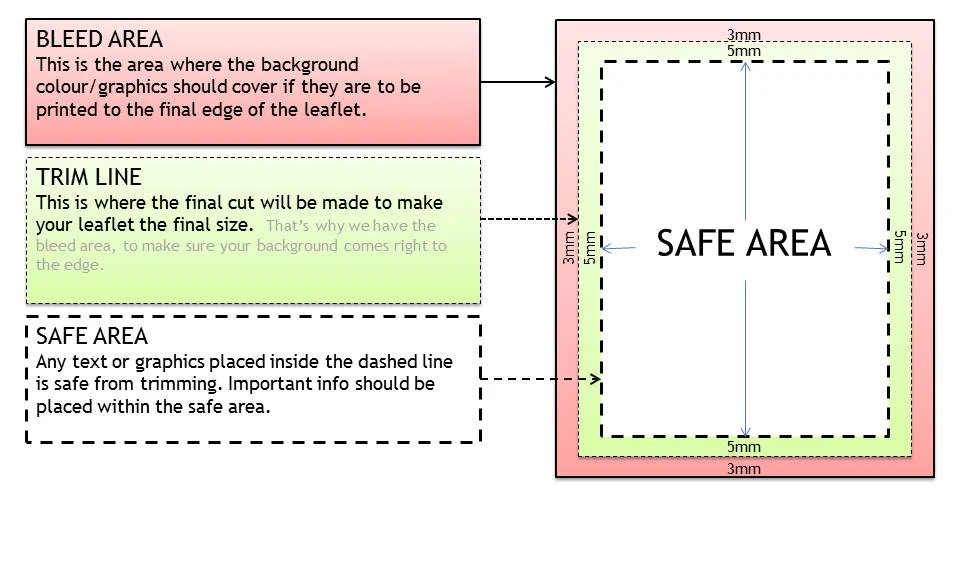
A bleed is the extra 3mm of image or background that extends beyond the finished size of your printed piece (such as a business card or flyer). It ensures that when your design is trimmed, no unwanted white edges appear.
- Example:
- Business card finished size: 85 x 55 mm
- File with bleed: 91 x 61 mm (3mm bleed on each side)
This area will be trimmed off after printing, so it should contain background color or images — not important text or logos.
- Why is Bleed Important?
During cutting, even professional trimming machines can have a margin of error of 1–2mm. The bleed compensates for these small variations, ensuring the printed colors reach the edge of the paper.
Without bleed, you risk having thin white edges that ruin the final look.
- Safe Zone
Keep all essential text, logos, or borders at least 3mm inside the finished size (not counting the bleed). This is known as the safe zone.
- Anything inside this zone is guaranteed to appear properly after cutting.
- Anything too close to the edge may be trimmed or appear uneven.
- Borders and Cutting Limitations
Avoid using thin borders (2–3mm) around your design. Because of cutting tolerances, even a small shift during trimming can make the borders appear uneven — thicker on one side, thinner on another.
If you want a framed look, use wider borders (at least 5mm + 3mm bleed ) or a colored background that covers the entire bleed area.
Key Takeaway: Always design with a 3mm bleed and avoid thin borders. This ensures professional, precise, and visually consistent results for all your printed materials.